
Everything a development team needs to integrate SMS sending from its own system: credentials, endpoint, test environment, character encoding and error handling.
What an SMS API does and when you need one
An SMS API is the interface that lets a system send text messages automatically, with no human involvement. Your e-commerce platform, your core banking system, your CRM or your queue management software makes an HTTP request, and the provider takes care of getting the message to the recipient handset through the mobile operator.
You need one as soon as sending stops being a manual task: OTP codes, alerts, confirmations, delivery notices, reminders. For occasional bulk campaigns, on the other hand, the web console is usually enough: you upload a list and schedule the send without writing any code.
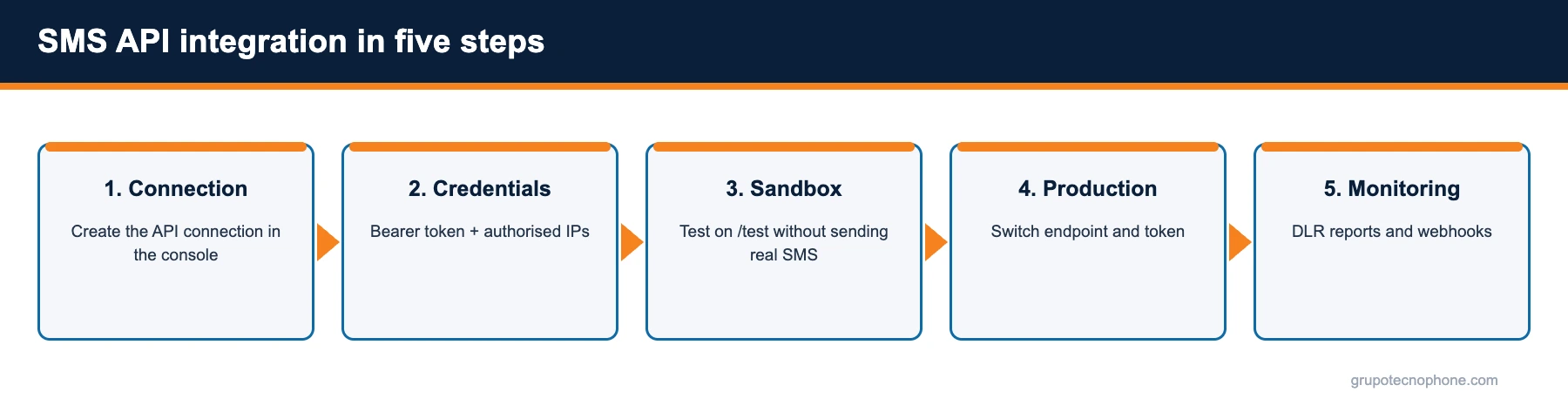
Step 1: create the connection and get credentials
On the Grupo Tecnophone platform, integration starts in the web console (app.grupotecnophone.com), under API Connections then SMS. Creating a connection generates a Bearer token, different for sandbox and production, and lets you configure the IP addresses requests will be accepted from. No request is processed unless it arrives with a valid token from an authorised IP.
The same screen defines the operating mode: plain text, or encryption enabled, where the destination and content fields travel encrypted with RSA-OAEP-SHA256 and Base64 encoded. Encryption is optional, but strongly recommended for banking and any case where the message content is sensitive.

Step 2: understand the send endpoint
The production endpoint is https://api.grupotecnophone.com/prod/v1/sms/send and the sandbox one is https://api.grupotecnophone.com/test/v1/sms/send. Both take a POST request with a JSON body containing two required fields: to (destination number) and body (message text). Every request must include the Authorization: Bearer {token} header and an identifiable User-Agent, which the platform uses for traceability and anomaly detection.
{
"to": "+5215512345678",
"body": "Your order #48213 has shipped. It arrives tomorrow between 10am and 2pm."
}
The number can be sent in international E.164 format (with the plus sign and country code) or as a national number; if the connection is tied to a single country, the platform completes the prefix automatically. A successful response returns a unique identifier (sid), the status, the encoding used, the character count and the number of segments.
{
"sid": "sms_20251213164422_39bdafbd",
"status": "success",
"to": "+5215512345678",
"encoding": "GSM7",
"num_chars": 58,
"num_segments": 1,
"error": null
}
Step 3: test in sandbox before going live
The sandbox environment validates exactly what production validates (token, IP, payload format, encryption, business rules) but sends no real messages and consumes no credit. It is the place to test the integration, the error cases and your response handling. When everything works, going live means changing the endpoint and the token; the code stays the same.
One practical tip: store the sid of every message in your database alongside the identifier of your own operation (the order, the session, the alert). That mapping is what later lets you reconcile delivery reports and handle customer complaints.
Character encoding and segments: what drives cost
An SMS holds up to 160 characters when it uses the GSM7 alphabet (unaccented letters, digits and basic symbols) and only 70 when it needs UCS-2, which happens as soon as a character outside that alphabet appears, such as the vowels with an acute accent (á, í, ó, ú) or an emoji; ñ is part of GSM7. A longer message is split into segments, and every segment is billed.
The platform determines the encoding automatically from the content and the connection settings: if only GSM7 is enabled, unsupported characters are normalised to compatible equivalents; if UCS-2 is enabled, GSM7 is used whenever possible and UCS-2 only when the text requires it. Segment concatenation is also controlled from the connection; if it is disabled, the message is capped at one segment. Checking the num_segments field in the response is the simplest way to spot messages that are being billed twice.
Error handling and best practices
The API responds with standard HTTP codes: 200 when the message was accepted, 400 for validation, encryption or business-rule errors, 401 if the token is missing or invalid, 403 if the IP is not authorised, and 500 for an internal error. On 400 errors, the body includes a symbolic and numeric code with its description; for example INPUT_PHONE_BLACKLISTED (1205) when the number is on an exclusion list, INSUFFICIENT_BALANCE (8001) when a prepaid account has no credit, or ENCRYPTION_REQUIRED (1999) when the connection requires encryption and plain text was sent.
- Retry only on 500 or network errors, with exponential backoff; never on a 400, which will simply repeat.
- Log the sid, error code and timestamp of every message.
- Validate the number format before calling the API so you do not waste requests.
- Use a User-Agent carrying your application name and version: it makes support far easier.
- Keep the token out of source control and rotate it periodically from the console.
The official documentation includes copy-ready examples in cURL, PHP, Python, Node and Java, both in plain text and with RSA encryption. You will find it in the Developers section of this site.
If you are just getting started, it helps to understand what an SMS gateway is and how it connects your system to mobile networks.
Sources
- “3GPP TS 23.038: Alphabets and language-specific information”, ETSI / 3GPP. Read source
- “3GPP TS 23.040: Technical realization of the Short Message Service (SMS)”, ETSI / 3GPP. Read source
- “E.164: The international public telecommunication numbering plan”, UIT-T. Read source
- “RFC 8017: PKCS #1: RSA Cryptography Specifications Version 2.2”, IETF, November 2016. Read source
Frequently asked questions


Need an enterprise SMS platform?
Grupo Tecnophone provides enterprise SMS messaging in Mexico, an API with sandbox and encryption, per-message delivery reports and a console for campaigns. Talk to an expert or read the developer documentation.