
Sending an SMS is half the job; the other half is knowing whether it arrived. Here are delivery reports, the states a message goes through, and how to receive all of it in your system through webhooks.
Why knowing the message was sent is not enough
When your system calls the API and gets a successful response, the message was accepted by the platform, not delivered to the handset. Several stages sit between that moment and arrival on the device: routing to the operator, acceptance by the network, delivery attempts if the handset is off or out of coverage, and finally confirmation or rejection.
For a bank alert, an OTP or a delivery notice, that difference matters. If the message did not arrive, your system should know so it can retry on another channel, alert a support agent or simply log it. The mechanism that makes this possible is the delivery report, known as the DLR.
What a delivery report (DLR) is
The DLR is a notification the mobile operator returns for each message, stating its final status. It travels back along the same chain: from the operator to the provider gateway, and from there to your console, your reports and, if you configured it, your system.
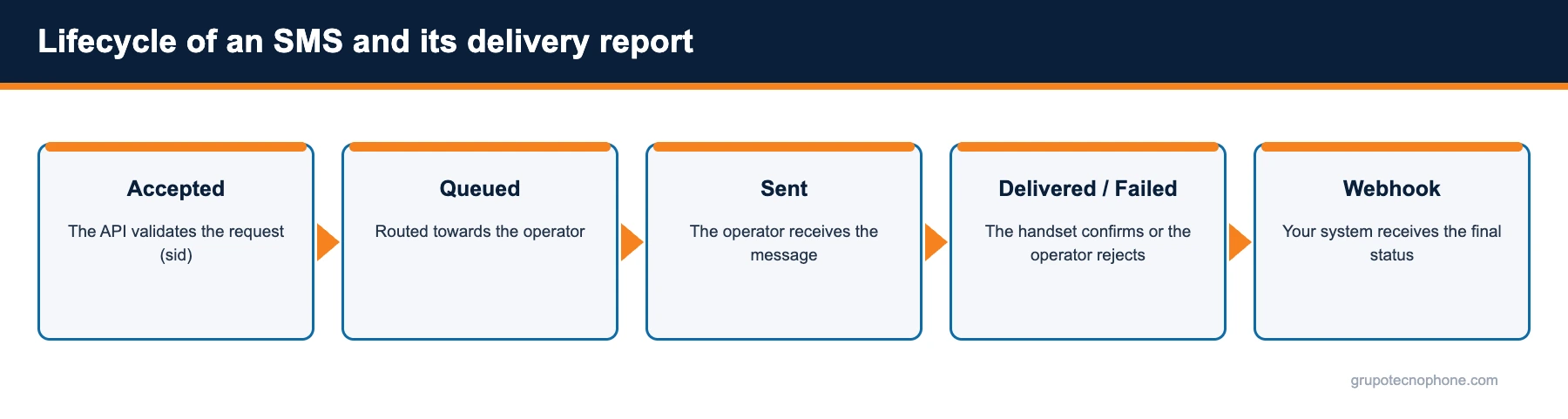
The most common states across the lifecycle are: accepted (the platform validated the request and assigned a sid), queued (the message is routed towards the operator), sent (the operator received it on its network), delivered (the handset confirmed reception) and failed or undelivered (the operator could not complete delivery, with a reason: number does not exist, handset off throughout the validity period, number on an exclusion list, rejection by operator filters). Some operators also report expired when the retry window ran out.
On the Grupo Tecnophone platform, reports can be viewed per message, per campaign and per operator, exported to CSV, or received in real time through a webhook.

What a webhook is and why it beats polling
There are two ways to learn the status of a message: asking (polling) or being told (webhook). With polling, your system periodically queries the status of every message, which creates unnecessary load and delay. With a webhook, you register a URL on your system and the platform sends an HTTP request every time an event happens: the message was delivered, it failed, or a customer replied.
A webhook turns your system into an event receiver. The moment the operator confirms delivery, your database updates without anyone having to ask. For critical operations, it is the only sensible way to keep the real state of your communications in sync.
How to implement the webhook receiver
- Expose an HTTPS endpoint on your system that accepts POST requests with a JSON body.
- Respond quickly with a 200; process the event asynchronously (internal queue) if there is heavy work to do.
- Make processing idempotent: the same event can arrive more than once; use the sid as the key so updates are not duplicated.
- Match the event sid against the record of your original message to update the state of the order, alert or session.
- Log every event received with its timestamp; they are useful for audit and for resolving complaints.
- Restrict endpoint access to the platform IP addresses and validate the payload format before processing it.
If your endpoint is unavailable when an event fires, it is worth having a reconciliation process that reads the exported reports to fill any gap.
Inbound messages (MO): when the customer replies
Beyond delivery reports, the same mechanism serves to receive messages originated by the customer (MO, Mobile Originated): a survey answer, an appointment confirmation with the word YES, an opt-out request with the word STOP. The platform receives the reply from the operator and hands it to your system by webhook, with the sender number, the text and the date.
This enables two-way flows with nothing for the customer to install: confirming a delivery, validating an operation, handling a contact request. Replies are also visible in the console and can be exported.
What to do with delivery data
Reports are not just a log; they are a source of decisions. A high failure rate on one specific operator can point to a routing problem your provider needs to address. A list of numbers that fail repeatedly should be cleaned from your database so you stop paying for messages that never arrive. And the time between send and delivery tells you whether your transactional traffic is competing with bulk campaigns and needs its own connection.
In the Grupo Tecnophone console these indicators are available by project, campaign and operator. To pull them into your own dashboards, the webhook and CSV export are the way. Configuration details are in the Developers section.
See also: What is an SMS gateway · How an SMS is delivered, step by step
Sources
- “Short Message Peer to Peer Protocol Specification v3.4”, SMPP Developers Forum, October 12, 1999. Read source
- “RFC 9110: HTTP Semantics”, IETF, June 2022. Read source
- “RFC 8259: The JavaScript Object Notation (JSON) Data Interchange Format”, IETF, December 2017. Read source
Frequently asked questions


Need an enterprise SMS platform?
Grupo Tecnophone provides enterprise SMS messaging in Mexico, an API with sandbox and encryption, per-message delivery reports and a console for campaigns. Talk to an expert or read the developer documentation.