
160 characters is the number everyone knows, but a single accent can bring it down to 70. Here is how an SMS is encoded, what a segment is and how to write messages that do not cost twice as much.
Where the 160 characters come from
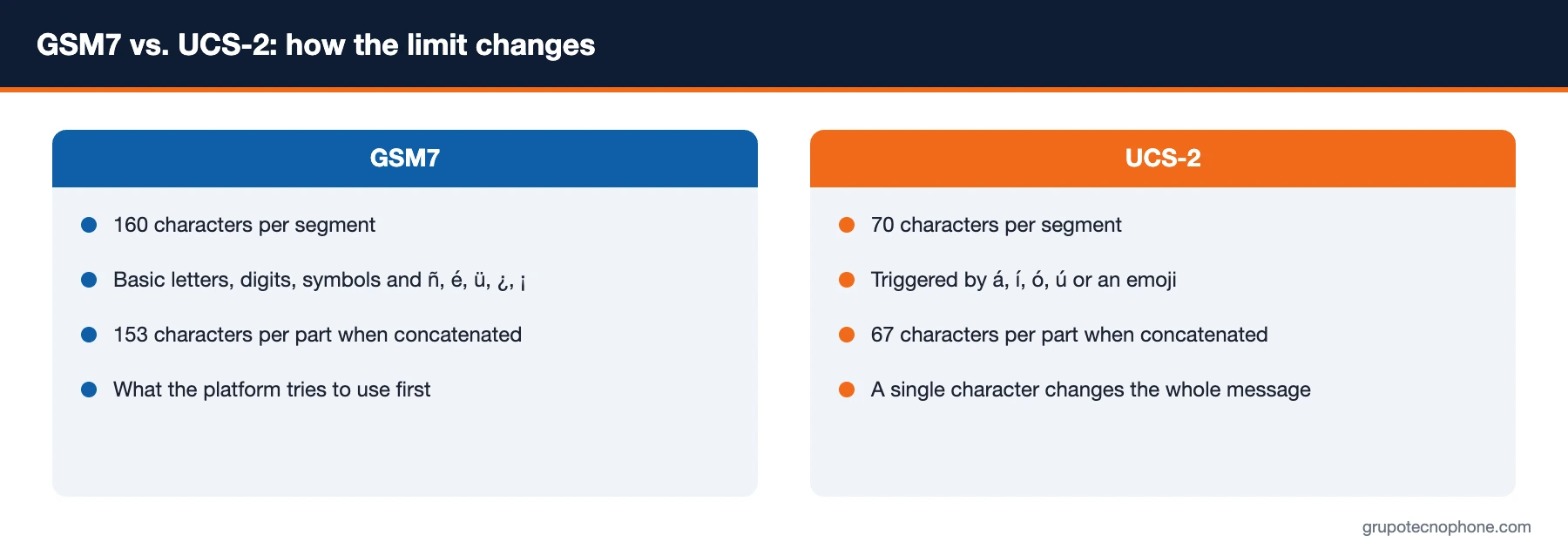
SMS was born in the 1990s with a limit of 140 bytes per message. With the GSM7 alphabet, which uses 7 bits per character, those 140 bytes hold 160 characters. That alphabet covers the English letters, digits, basic punctuation and a few symbols, but not every character used in Spanish.
When the message contains a character GSM7 cannot represent, the handset and the network switch to UCS-2, which uses 16 bits per character: the same 140 bytes now hold only 70 characters. A single character outside the alphabet is enough to encode the entire message in UCS-2.
Which characters fit in GSM7 and which do not
They fit: letters A to Z in upper and lower case, digits, the space, the signs . , ; : ! ? ‘ ” ( ) @ # $ % & * + – / = < > and the line break. From Spanish, ñ and Ñ fit, as do é and É, ü and Ü, and the ¿ and ¡ signs. Characters such as the euro sign, curly braces or the backslash take two positions each.
They do not fit: á, í, ó and ú (or their uppercase forms), emojis and any symbol outside the basic set. Because the exact rules have edge cases, the safest approach is to trust the platform counter.

Segments and concatenation
When a message exceeds the limit, it is split into segments that the handset reassembles. To make that possible, each segment reserves a few header bytes, so the capacity per part drops: 153 characters in GSM7 and 67 in UCS-2. A 200-character text in GSM7 takes two segments; the same text with a single á takes three.
Every segment is billed as a message. That is why the num_segments field in the API response, or the counter in the console, is the single most important number for controlling cost.
How the Grupo Tecnophone platform handles it
Encoding is determined automatically from the content and the connection settings. If only GSM7 is enabled, unsupported characters are normalised or replaced with compatible equivalents (for example, á becomes a and ó becomes o), which guarantees a 160-character segment. If UCS-2 is enabled, the platform uses GSM7 wherever it can and falls back to UCS-2 only when the text demands it.
Concatenation is also configured per connection: if it is disabled, the message is capped at a single segment and any surplus text is not sent. The API response reports the encoding applied (encoding), the character count (num_chars) and the segments (num_segments) for each message.
Practical recommendations
- Avoid á, í, ó and ú with accents when the message is operational (OTP, notices, collections); the customer reads it just the same.
- Save emojis for promotional messages where the impact justifies the cost, and always check the counter.
- Use the console preview or test in sandbox to see the segments before sending.
- Cut the filler: long greetings, signatures, repetition. One fact and one action fit in 160 characters.
- If you genuinely need more room, consider a short link to a page with the detail.
See also: What is a flash SMS and when should your company use it · How to choose an SMS provider in Mexico: 12 questions to ask before signing · How an SMS is delivered, step by step
See also: Glossary of SMS and Business Messaging Terms
Sources
- 3GPP TS 23.038, Alphabets and language-specific information: GSM 7-bit default alphabet, extension table and UCS-2 encoding. 3gpp.org
- 3GPP TS 23.040, Technical realization of the Short Message Service (SMS): message length and concatenation. 3gpp.org
Frequently asked questions



Need an enterprise SMS platform?
Grupo Tecnophone provides enterprise SMS messaging in Mexico, an API with sandbox and encryption, per-message delivery reports and a console for campaigns. Talk to an expert or read the developer documentation.