
An appointment that is not kept is time and money lost. SMS reminders with confirmation reduce no-shows measurably. Here is when to send them, what to say and how to automate them.
The problem: no-shows nobody warns you about
In clinics, medical practices, bank branches, workshops, public offices and home services, a significant share of booked appointments are not kept. Most are never cancelled: the customer simply forgot, mixed up the date or had no way to let anyone know. Every gap is an idle resource and, in healthcare or public services, a waiting list that grows longer.
The SMS reminder attacks the main cause directly, forgetfulness, and with a reply it also frees the slot in time to reassign it.
When to send the reminder
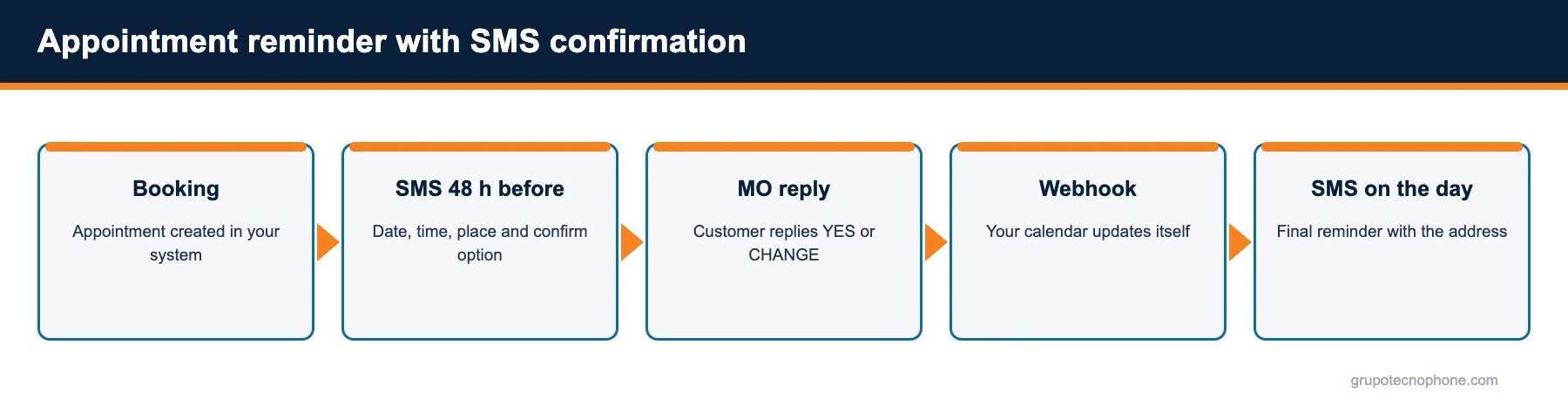
The sequence that works best in practice is a pair: a first message 48 hours ahead, with the option to confirm or request a change, and a second message on the morning of the appointment, with time, address and directions. For appointments booked more than two weeks in advance, an initial confirmation message at booking time reinforces commitment.
Avoid sending in the middle of the night and respect reasonable hours (between 8am and 8pm). If the customer replied that they will not attend, do not send the second reminder; send the option to rebook instead.

What the message should say
Identify the sender, state date, time and place, and ask for one simple action. An example: “Clinica Reforma: a reminder of your appointment with Dr. Lopez on Thursday 12 at 10:30, Av. Reforma 250. Reply YES to confirm or CHANGE to rebook.”
Keep the text within one segment (160 characters without accents, or let the platform normalise the characters), include the professional or service name where it adds clarity, and never include sensitive data such as diagnoses.
Templates to confirm an appointment by SMS
These templates ask for a simple reply to confirm, cancel or reschedule, and each fits in a single SMS within the GSM7 alphabet. To receive replies you need a numeric sender and, to automate them, a two-way SMS flow.
Clinics and practices
- “South Clinic: your appointment is tomorrow at 9:00 with Dr. Ruiz. Reply 1 to confirm or 2 to reschedule.”
- “North Dental: we expect you on Monday 14 at 17:30. Reply YES to confirm or NO if you cannot attend.”
Workshops and home services
- “Motor Garage: your service is booked for Saturday at 10:00. Reply YES to confirm or CHANGE to pick another time.”
- “ClimaPro: the technician will arrive on Thursday between 9 and 12. Reply YES to confirm or CHANGE if nobody will be home.”
Public services and branches
- “City Government: your licence appointment is on 15/03 at 9:00 at the Centro office. Reply YES to confirm or NO to release it.”
- “North Bank: your appointment at the Roma branch is on Friday at 11:00. Reply YES to confirm or CHANGE to reschedule.”
More cases for public agencies in SMS for government, and more templates by message type in 30 SMS message examples and templates.
Confirmation by reply
A reminder that only informs reduces forgetfulness; one that asks for confirmation also frees slots. To receive replies, the sender must be a short code or a long number (alphanumeric senders accept no replies). The customer reply (YES, NO, CHANGE) reaches the platform as an inbound message and can be handed to your booking system by webhook, so the appointment status updates with no human involvement.
Replies are also visible in the console, in case your team prefers to handle them manually at first.
How to automate it from your booking system
If your calendar is an in-house system or software with integrations, the most efficient approach is to have it fire the reminders itself: each booked appointment generates two messages through the API at the defined moments. Integration is one HTTPS call per message, with a token and from an authorised IP; code examples are in the developer documentation.
If you have no integration, the console lets you upload a file each morning with the next day appointments and schedule the send. It is less elegant, but it works and can be set up in an afternoon.
What results to expect and how to measure them
Organisations that implement reminders with confirmation typically cut no-shows by around a quarter, and more when more than one reminder is sent, and recover a good share of the freed slots. Measure three things: reminder delivery rate, reply rate, and no-show rate before and after. The platform reports cover the first two; the third comes from your calendar.
If you want to implement reminders in your operation, the Grupo Tecnophone team can help you define the right sequence and sender; write to us from the contact page.
See also: SMS for call centers
Sources
- “No-shows in appointment scheduling – a systematic literature review”, Health Policy (Dantas et al.), April 2018. Read source
- “Using digital notifications to improve attendance in clinic: systematic review and meta-analysis”, BMJ Open (Robotham et al.), October 24, 2016. Read source
- “How effective are short message service reminders at increasing clinic attendance? A meta-analysis and systematic review”, Health Services Research (Guy et al.), April 2012. Read source
- “The Effectiveness of SMS Reminders on Appointment Attendance: a Meta-Analysis”, Journal of Medical Systems, February 6, 2016. Read source
Frequently asked questions
Need an enterprise SMS platform?
Grupo Tecnophone provides enterprise SMS messaging in Mexico, an API with sandbox and encryption, per-message delivery reports and a console for campaigns. Talk to an expert or read the developer documentation.