
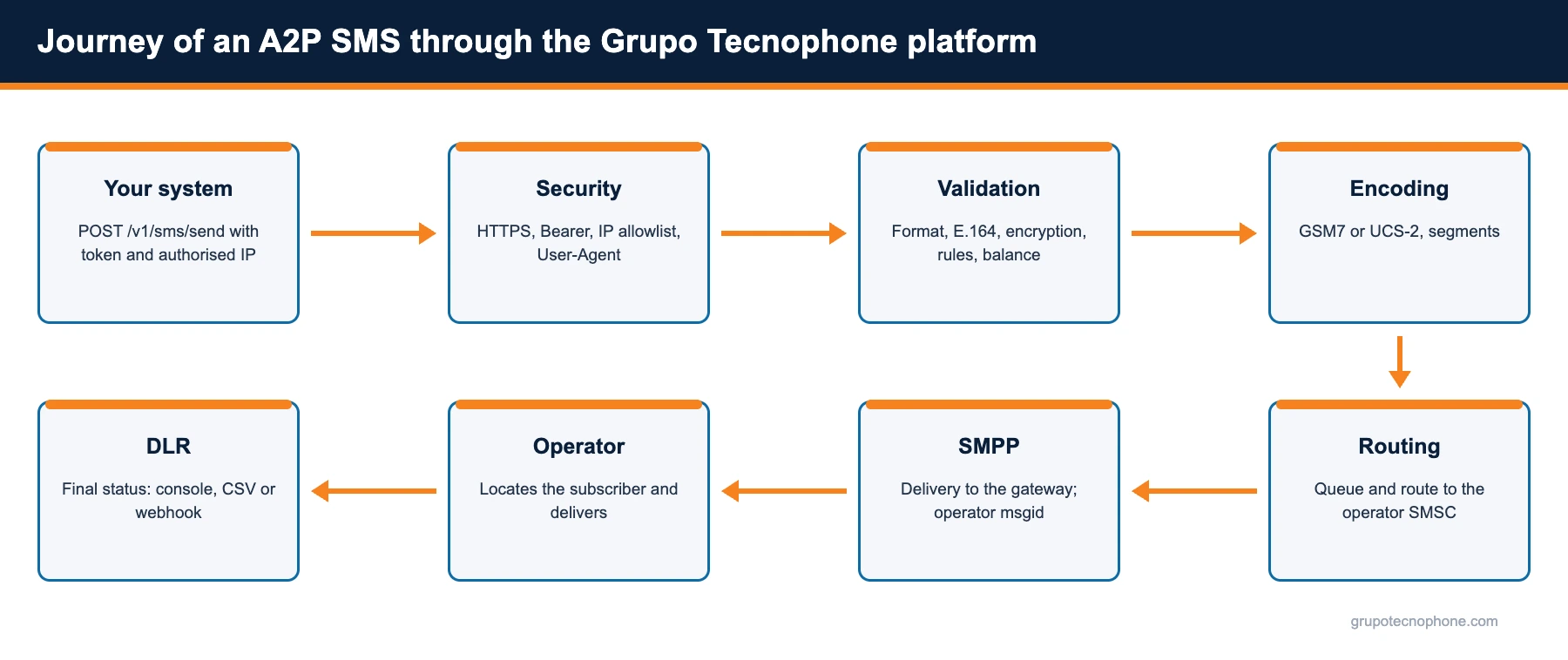
Less than five seconds and more than ten stages separate the API call from the buzz in the customer pocket. Here is the full journey, following the official Grupo Tecnophone API documentation.
Why the journey is worth understanding
To a development team, an SMS is an HTTP request that returns an identifier. To an operations team, it is a row in a report. To the customer, it is a buzz in the pocket. Between those three viewpoints sits a chain of systems and decisions that determines whether the message arrives, how long it takes and how much it costs.
This article describes that journey as the Grupo Tecnophone platform implements it, following its official API documentation. It helps you integrate better, diagnose faster and understand what every field in the response and the reports actually means.
Stage 1: your system makes the request
It all starts with a POST request to https://api.grupotecnophone.com/prod/v1/sms/send (or /test/v1/sms/send in sandbox). The body is JSON with two fields: to, the destination number, and body, the message text. The required headers are Authorization: Bearer {token}, with the token assigned to the connection, and an identifiable User-Agent, which the platform uses for traceability, support and detection of anomalous usage patterns.
POST /prod/v1/sms/send HTTP/1.1
Host: api.grupotecnophone.com
Authorization: Bearer YOUR_TOKEN
User-Agent: MyCompany/1.0
Content-Type: application/json

{"to": "+5215512345678", "body": "Your MyCompany code is 482913. Do not share it."}
Stage 2: security checks
Before looking at the content, the platform verifies three things. That the request arrived over HTTPS; the whole API operates exclusively over encrypted transport. That the token is valid and active; if it is missing or invalid, it responds 401. And that the source IP address is on the list of IPs authorised for that token, configured from the console; if it is not, it responds 403.
Each connection also runs in an encryption mode chosen by the customer. With encryption enabled, the to and body fields must arrive encrypted with RSA-OAEP-SHA256 and Base64 encoded; if plain text arrives, the API returns the error ENCRYPTION_REQUIRED (code 1999). With encryption disabled the opposite applies: if it detects encrypted content, it returns ENCRYPTION_NOT_ALLOWED. The JSON structure is identical in both cases; only the field contents change.
Stage 3: validation and normalisation
Once access checks pass, the platform validates the destination number and normalises it to international E.164 format (for example, +5215512345678). The number can be sent with the country code or as a national number; if the connection is tied to a single country, the platform automatically adds the prefix configured for that route.
It then applies the account business rules: it checks the number is not on an exclusion list (otherwise it returns INPUT_PHONE_BLACKLISTED, code 1205), checks the balance on prepaid accounts (INSUFFICIENT_BALANCE, code 8001, if it is short) and validates any other configured restriction. All these rejections return an HTTP 400 with a symbolic code, a numeric code and a descriptive message, so your system can handle each one differently.
Stage 4: encoding and segmentation
With the message accepted, the platform decides how it will be encoded. If the text only uses characters from the GSM7 alphabet, it fits in 160-character segments. If it includes characters GSM7 does not support (vowels with an acute accent such as á, í, ó, ú, or emojis; ñ is part of GSM7), it needs UCS-2, with 70-character segments.
The behaviour depends on the connection settings: if only GSM7 is enabled, unsupported characters are normalised or replaced with compatible equivalents; if UCS-2 is enabled, the platform tries to use GSM7 whenever possible and only falls back to UCS-2 when the text demands it, to avoid extra charges. Concatenation is also controlled per connection: if it is off, the message is capped at a single segment. The outcome is reflected in the response fields encoding, num_chars and num_segments.
Stage 5: acceptance and response to your system
At this point the platform assigns a unique identifier to the request, the sid (for example, sms_20251213164422_39bdafbd), and responds with HTTP 200. The response includes the status, the normalised number, the encoding, the character and segment counts, and an empty error field. The initial message state is queued: accepted and pending delivery.
{
"sid": "sms_20251213164422_39bdafbd",
"status": "success",
"to": "+5215512345678",
"encoding": "GSM7",
"num_chars": 48,
"num_segments": 1,
"error": null
}
It is important to understand that a 200 means accepted by the platform, not delivered to the handset. Delivery happens in the following stages, and its outcome arrives later through the delivery report. Store the sid: it is the key to everything that follows.
Stage 6: routing to the operator
The message enters the platform send queue, which picks the route based on the destination operator, checking number portability to know which network that number belongs to today. Grupo Tecnophone operates a redundant infrastructure in Mexico, so if one route degrades another takes the traffic.
Communication with the operator uses SMPP (Short Message Peer-to-Peer), the standard protocol between messaging platforms and operator message centres (SMSC). When the SMSC accepts the message it returns its own identifier, the msgid_smpp, which the platform links to the sid. That identifier may not be available immediately in the initial response, but it is recorded for traceability.
Stage 7: delivery by the operator
The operator SMSC locates the subscriber on its network (which cell the handset is registered in) and delivers the message over the signalling channel, which is why an SMS arrives even when the user has no data connection and no app open. If the handset is switched off or out of coverage, the SMSC stores the message and retries during its validity period; when that expires, it marks it as expired.
Operators also apply their own content and behaviour filters at this stage. A registered sender, clear content and a consistent traffic pattern are the best guarantee of getting through those filters.
Stage 8: the delivery report comes back
When the handset confirms reception, the SMSC generates a delivery report (DLR) that travels back over the SMPP connection to the platform. There it is matched to the original sid and the message state becomes delivered, with date and time; if delivery failed or expired, the state reflects that with whatever reason the operator reported.
That state is available in the platform console, by message, campaign and operator; it can be exported to CSV; and, if you configured a webhook, the platform sends an HTTP request to your system with the sid and the final status as soon as it receives it. Customer replies (MO messages) follow the reverse path, from handset to operator, then to the platform and on to your system by webhook.
How long all of this takes
Under normal conditions, one to five seconds pass between the request and delivery. Stages 1 to 5 happen in milliseconds inside the platform; the remaining time is routing and delivery on the operator network. What stretches the journey is operator congestion at peak hours, a handset switched off or out of coverage, and queues shared with bulk traffic, which is why separating transactional traffic onto its own connection is recommended.
If you want to test the whole journey without sending real messages, the sandbox environment validates every platform stage (token, IP, payload, encryption, business rules) and returns the same response structure. The official documentation, with examples in cURL, PHP, Python, Node and Java, is in the Developers section; to set up a connection, write to us from the contact page.
See also: Information security at Grupo Tecnophone · How to choose an SMS provider in Mexico: 12 questions to ask before signing
Sources
- “Short Message Peer to Peer Protocol Specification v3.4”, SMPP Developers Forum, October 12, 1999. Read source
- “3GPP TS 23.038: Alphabets and language-specific information”, ETSI / 3GPP. Read source
- “Todo lo que debes saber sobre la portabilidad numérica”, Comisión Reguladora de Telecomunicaciones. Read source
- “RFC 8017: PKCS #1: RSA Cryptography Specifications Version 2.2”, IETF, November 2016. Read source
Frequently asked questions


Need an enterprise SMS platform?
Grupo Tecnophone provides enterprise SMS messaging in Mexico, an API with sandbox and encryption, per-message delivery reports and a console for campaigns. Talk to an expert or read the developer documentation.