
Every failed delivery costs a second trip. SMS notices at the right moments (dispatched, on the way, delivered) cut failed visits and calls to the contact centre. A practical guide.
The real cost of a failed delivery
A delivery that does not happen because nobody was home means rescheduling, reloading the parcel, a second route and, often, a call from the customer asking what went wrong. For operations running thousands of deliveries a day, a small failure percentage turns into an enormous cost.
Most of those failures are avoided with information delivered in time: if the customer knows when the parcel is arriving and can confirm or reschedule, they will be there. SMS is the ideal channel because it reaches any handset, is read within minutes and can be automated from the logistics system.
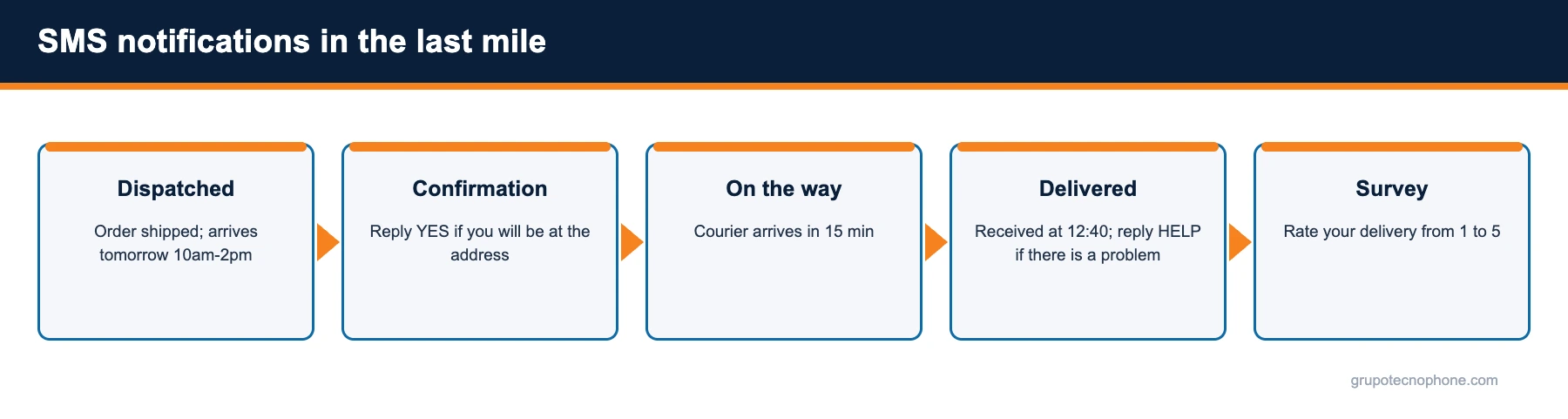
The five messages that matter
- Dispatched from the warehouse: estimated date and delivery time window.
- Advance confirmation: asks whether the customer will be at the address, with a YES or CHANGE reply.
- On the way: a notice when the courier is minutes away, with the courier name where relevant.
- Delivered: confirmation with the time and, if something went wrong, a keyword to report it.
- Survey: a one-number rating of the delivery, to measure quality by route or courier.
Not every shipment needs all five; a B2B operation may use only dispatched and delivered, while e-commerce benefits from the full sequence.

How to automate it from the logistics system
Every shipment status change in your TMS, WMS or routing platform fires a message through the API: an HTTPS request with the customer number and the text carrying the shipment variables. The SMS delivery status comes back by webhook, so your system knows whether the customer was notified. Customer replies (YES, CHANGE, HELP) arrive through the same mechanism and can update the order or open a ticket.
For operations without an integration, the console lets you upload each morning the file of that day shipments with their time windows and schedule the notices.
Sender and content
Use a dedicated long or short number so customers can reply, and always the same one so they recognise it. In the text, identify the company, include the order or tracking number, the time window and one single action. Avoid generic tracking links that look suspicious; if you include one, make it your own domain.
An example: “Paqueteria Rapida: your shipment 7731-A arrives today between 2pm and 5pm. Reply YES if you will be at the address or CHANGE to reschedule.”
What to measure
Compare the failed delivery rate before and after introducing the notices, the reply rate to the advance confirmation, and the volume of status-enquiry calls to the contact centre. The platform delivery reports tell you what percentage of customers were actually notified and on which operator failures occurred.
If your logistics operation wants to cut failed deliveries, take a look at the retail and logistics solution or request a demo.
See also: What is a flash SMS and when should your company use it
Sources
- “Estudio de Venta Online 2026 (versión pública)”, Asociación Mexicana de Venta Online (AMVO), March 2026. Read source
- “Comunicado de prensa 32/26: Encuesta Nacional sobre Disponibilidad y Uso de Tecnologías de la Información en los Hogares (ENDUTIH) 2025”, INEGI, June 16, 2026. Read source
- “Ley Federal de Protección de Datos Personales en Posesión de los Particulares”, Cámara de Diputados, March 20, 2025. Read source
- “Ley Federal de Protección al Consumidor”, Cámara de Diputados. Read source
Frequently asked questions
Industry solution: see how Grupo Tecnophone supports this use case in SMS for Logistics.

Need an enterprise SMS platform?
Grupo Tecnophone provides enterprise SMS messaging in Mexico, an API with sandbox and encryption, per-message delivery reports and a console for campaigns. Talk to an expert or read the developer documentation.