
You do not need a developer to launch an SMS campaign. With a list in Excel or CSV and the web console you can personalise, schedule and measure the send in minutes. A step-by-step guide. You can send bulk SMS from Excel without writing a single line of code.
What you need before you start
Three things: an account on the platform with credit or an active contract, a contact list with consent to receive the message, and the text you want to send. For commercial messages, remember consent must be prior and demonstrable, and the message must offer a way to opt out; we cover the legal requirements in Mexico in a separate article.
No technical knowledge is required. The Grupo Tecnophone web console is designed so a marketing, collections or customer service team can run its own campaigns without depending on IT.
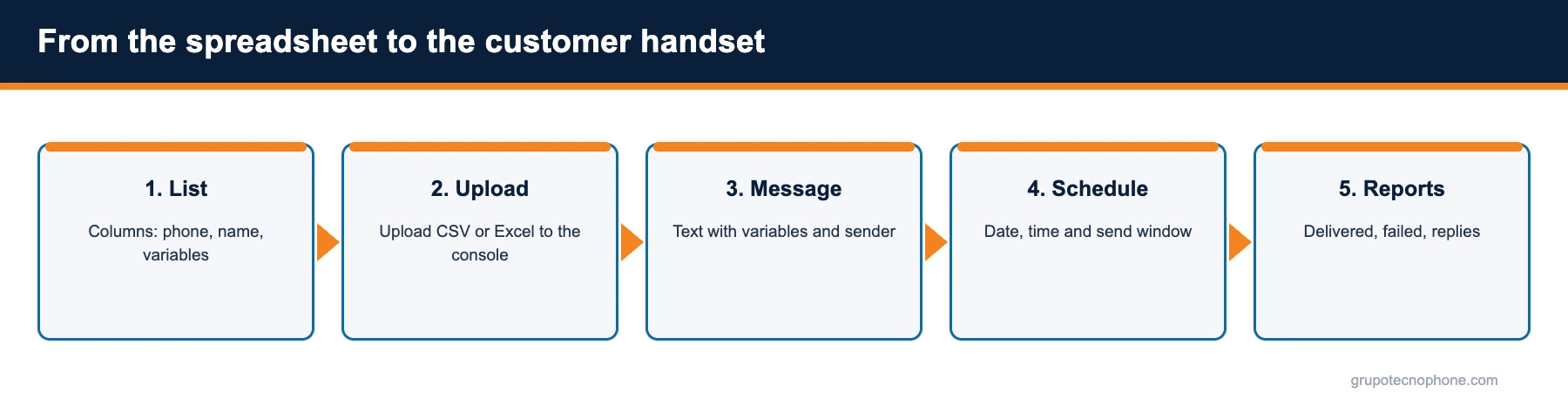
Step 1: prepare the list in Excel or CSV
The first column must hold the phone number, preferably in international format (+52 followed by the ten digits). Additional columns are the variables you want to use in the message: name, branch, amount, due date, order number. Use simple headers in the first row (phone, name, amount).
- Remove duplicates and empty rows.
- Check every number has ten digits after the country code.
- Strip spaces, dashes and brackets.
- Exclude contacts who opted out in previous campaigns.
- Save the file as CSV (UTF-8) or Excel (.xlsx).
A clean list is the single variable with most influence on delivery rate and cost: every invalid number is a message that never arrives and, in some cases, is still billed.

Step 2: upload the list and map the columns
In the console, inside the relevant project (Marketing or Collections, for example), create a new campaign and upload the file. The platform detects the columns and asks you to point out which one holds the phone number. The rest become available as variables for the text.
If your company runs several brands or store locations, it is worth having one project for each, with its own sender, users and reporting; that way campaigns do not get mixed up and each team only sees its own.
Step 3: write the message with variables
Write the text and insert the variables where they belong. An example for collections: “Banco Norte: Hi {name}, your payment of ${amount} is due on {date}. Avoid late fees by paying in the app or in branch.” Each contact receives the message with their own data.
Watch the character counter: a message of up to 160 characters without accents or emojis takes one segment; with accents or emojis the limit drops to 70 and the message can split in two, doubling the cost. The console preview shows how the message will look with real data and how many segments it will consume.
Step 4: choose the sender and schedule the send
Select the sender assigned to the project (brand name, short code or long number). Then decide whether to send immediately or schedule a date and time. For large lists, spread the send across a window (say, between 10:00 and 13:00) so you do not saturate the operator or your contact centre with simultaneous replies.
Before confirming, send a test to your own phone and a colleague. It is the cheapest way to catch a typo or a badly mapped variable.
Step 5: read the reports
As soon as the send starts, the console shows progress in real time: messages sent, delivered, failed and pending, broken down by operator. Reports can be filtered and exported to CSV to cross-reference with your own systems.
If the campaign uses a short or long number, customer replies also appear in the console and can be exported. Use recurring failures to clean the list before the next campaign. And if you want this data to reach your CRM automatically, you can configure a webhook; we explain it in the article on delivery reports.
Want to see the whole flow applied to your own case? Request a demo and we will walk you through a campaign end to end.
See also: What is an SMS gateway · Bulk SMS for business in Mexico: guide and best practices
Sources
- “RFC 4180: Common Format and MIME Type for Comma-Separated Values (CSV) Files”, IETF, October 2005. Read source
- “3GPP TS 23.038: Alphabets and language-specific information”, ETSI / 3GPP. Read source
- “A partir del 3 de agosto, México tendrá una nueva forma de marcación telefónica (Comunicado 34/2019)”, IFT, July 16, 2019. Read article
- “Preguntas frecuentes del Registro Público para Evitar Publicidad (REPEP)”, PROFECO. Read source
Frequently asked questions



Need an enterprise SMS platform?
Grupo Tecnophone provides enterprise SMS messaging in Mexico, an API with sandbox and encryption, per-message delivery reports and a console for campaigns. Talk to an expert or read the developer documentation.